 Note Names
Apps that name the notes on your sheet music
Several apps can now read sheet music and write the letter name on each note. They differ a lot in accuracy, how they show the letters and what they cost. Here is what to check.
How they work
You give the app a PDF or point the camera at a printed page. It finds the staves, the clef, the key signature and each notehead, works out each note's letter, and draws the letters on the page. Some do this on your device; others upload the page to a server.
What to look for
- Accuracy you can check. Every reader makes some mistakes, especially on dense chords and photos. Look for a quick way to fix a wrong letter, and for fixes that save with the piece.
- Key signatures and accidentals. An F that should be F♯ is still a wrong note. The letters should include sharps and flats from the key signature.
- Both hands and all clefs. Piano needs treble and bass together. Strings and winds need alto and tenor clef too.
- Letters that stay readable. On the note or beside it, and still legible when you zoom into crowded bars.
- A way to wean off. The goal is reading, so the app should let you reduce the letters as you learn.
- Camera and PDF. Photos of your printed books, plus PDFs from IMSLP or your teacher.
- Privacy. Does your music leave your device? Is there an account?
- Price model. Free tier, one-time purchase or subscription.
How Note Names answers those
- Reads PDFs and camera photos on your device, offline, with no account and no tracking.
- Treble, bass, alto and tenor clef; key signatures and accidentals applied, so letters show F♯ and B♭.
- Letters on the notehead or above and below the staff; they hold their size when you zoom.
- Tap a letter to fix it; fixes save with the piece.
- How many letters steps from all letters to fewer, landmarks, bar starts, ledger notes only, and none.
- Free to try: the Verified library of 25 classical pieces, checked note by note, plus your first own piece. Unlimited imports is a one-time purchase, with no subscription.
Questions
Is there an app that shows note names on sheet music?
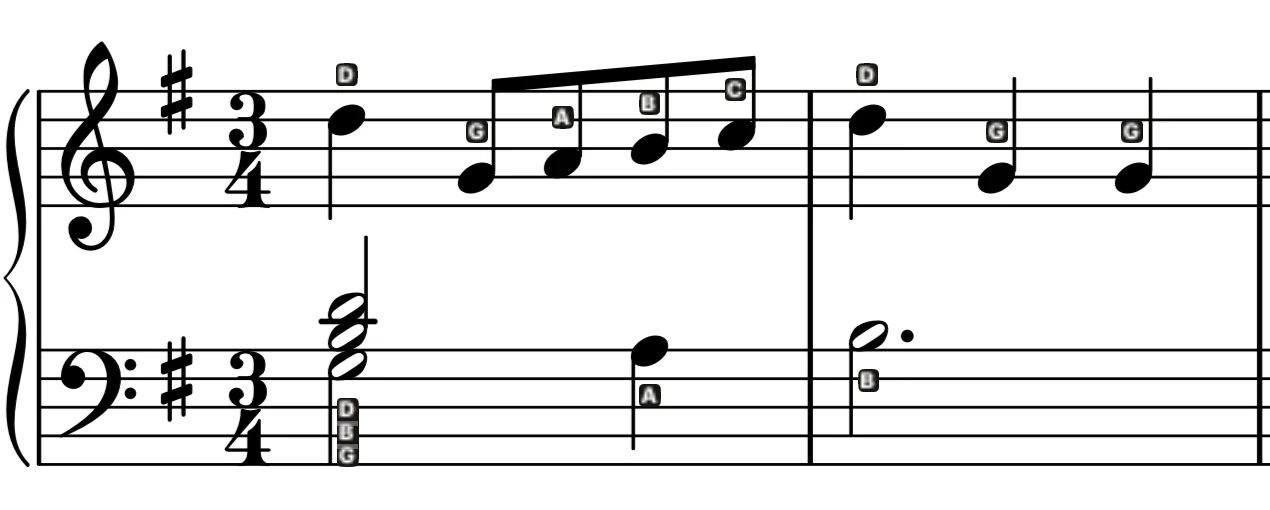
Yes. Note Names for iPhone and iPad reads a PDF or a camera photo of your sheet music and writes the letter name on every note.
Can an app scan sheet music and label the notes?
Yes. Note Names finds the staves in a photo of a printed page and labels each note, on your device.
Is Note Names free?
Free to try: 25 classical pieces and your first own piece are included. Unlimited imports is a one-time purchase.